


In today’s digital landscape, having a professional website is no longer optional for small businesses in the US. Your website serves as your 24/7 storefront, brand ambassador, and often the first impression potential customers have of your business. But with countless website builders available, choosing the right one can feel overwhelming.
The good news? You don’t need coding skills or a massive budget to create a stunning, functional website. The right website builder can help you establish a professional online presence quickly, affordably, and with minimal technical expertise. In this comprehensive guide, we’ll walk you through the best website builders specifically suited for small businesses in the US, comparing features, pricing, and ease of use to help you make the perfect choice.

What US Small Businesses Need in a Website Builder
Before diving into specific platforms, let’s understand the key features that make a website builder truly valuable for small businesses in the United States:
Ease of Use
As a small business owner, your time is precious. You need a platform with an intuitive interface that doesn’t require technical expertise. Look for drag-and-drop editors that make it easy to customize your site without writing a single line of code.

Mobile-Responsive Templates
With over 60% of web traffic coming from mobile devices, your website must look great on smartphones and tablets. The best website builders offer templates that automatically adjust to different screen sizes, ensuring your site provides an excellent experience for all visitors.
E-commerce Features
Whether you’re selling products directly or just want the option to expand later, robust e-commerce capabilities are essential. Look for features like secure payment processing, inventory management, and shipping options that comply with US regulations.
SEO Tools
Getting found online is crucial. The best website builders include built-in SEO tools to help your business rank higher in search results, including customizable meta descriptions, URL structures, and mobile optimization that align with Google’s requirements.
US-Based Customer Support
When you need help, having access to US-based customer support can make a significant difference. Look for platforms offering 24/7 support via phone, chat, or email, ideally with representatives familiar with US business requirements.

Pricing and Scalability
Your website should grow with your business. The ideal platform offers affordable starting plans with clear upgrade paths. Consider not just the initial cost, but the long-term value as your business expands. Many builders offer special pricing for US-based businesses.
Top Website Builders for Small Businesses in the US
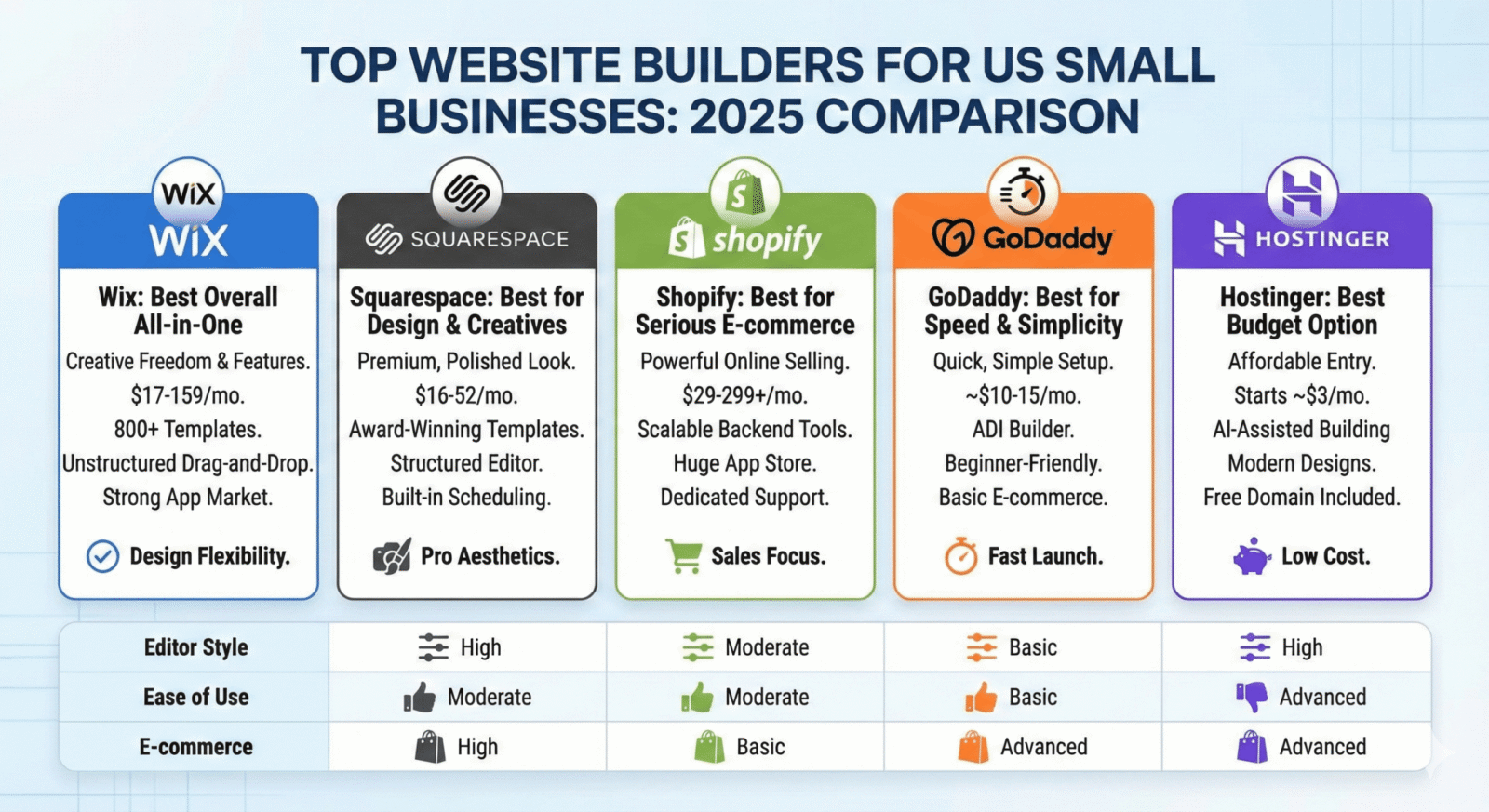
After extensive testing and analysis, we’ve identified the seven best website builders that meet the unique needs of US-based small businesses. Each platform offers different strengths, so we’ve broken down their features, pricing, and ideal use cases to help you find your perfect match.

1. Wix – Best All-Around Website Builder
Wix consistently ranks as the top choice for US small businesses due to its exceptional balance of ease of use, powerful features, and flexibility. With over 800 professionally designed templates and an intuitive drag-and-drop editor, Wix makes it easy for anyone to create a stunning website without technical skills.

Key Features:
- Intuitive drag-and-drop editor with pixel-perfect positioning
- 800+ professionally designed templates for various industries
- Wix ADI (Artificial Design Intelligence) for automated website creation
- Robust app market with 300+ integrations
- Advanced SEO tools and marketing features
- Secure payment processing with multiple US payment gateways
- 24/7 customer support with US-based representatives
Pricing Breakdown:
- Free Plan: Basic features with Wix branding
- Combo: $16/month – Personal use, no Wix ads
- Unlimited: $22/month – Small businesses, more storage
- Pro: $27/month – Complete professional package
- VIP: $45/month – First priority support
- Business Basic: $27/month – Essential e-commerce
- Business Unlimited: $32/month – Full e-commerce suite
- Business VIP: $59/month – Premium business features
*Prices shown with annual billing
Pros
- Extremely user-friendly interface
- Extensive template library
- Powerful e-commerce capabilities
- Excellent app marketplace
- Strong SEO tools
Cons
- Can’t switch templates after publishing
- Higher pricing than some competitors
- Can be overwhelming with too many options
Best For: Versatile small businesses needing a professional website with room to grow
2. Squarespace – Best for Design-Focused Businesses
Squarespace stands out for its stunning, professionally designed templates that make it perfect for businesses where visual appeal is paramount. If your small business is in a creative industry or relies heavily on visual presentation, Squarespace offers unmatched aesthetic quality.

Key Features:
- Award-winning designer templates with sophisticated aesthetics
- Powerful built-in blogging platform
- Integrated e-commerce with no transaction fees on higher plans
- Advanced analytics and SEO tools
- Email marketing campaigns built-in
- Scheduling and appointment booking features
- Social media integration and selling
Pricing Breakdown:
- Personal: $16/month – Basic website features
- Business: $26/month – Business tools and e-commerce
- Basic Commerce: $35/month – Essential online store
- Advanced Commerce: $54/month – Complete e-commerce solution
*Prices shown with annual billing
Pros
- Beautiful, professional templates
- All-inclusive platform with no need for plugins
- Excellent mobile responsiveness
- Strong e-commerce capabilities
- Built-in appointment scheduling
Cons
- Less flexible than some competitors
- Steeper learning curve initially
- Limited third-party integrations
Best For: Creative businesses, restaurants, photographers, and service providers
3. Shopify – Best for E-commerce Businesses
If your primary goal is selling products online, Shopify is the undisputed leader for US-based small businesses. Purpose-built for e-commerce, it offers everything you need to create, manage, and scale an online store with ease.
Key Features:
- Comprehensive e-commerce platform with unlimited products
- Multiple payment gateways with competitive rates
- Advanced inventory management system
- Abandoned cart recovery
- Shipping label printing and rate calculations
- Point-of-sale integration for physical stores
- Extensive app store for additional functionality
- 24/7 support via phone, email, and chat
Pricing Breakdown:
- Basic: $29/month – Essential features for new businesses
- Shopify: $79/month – Growing businesses with 1 retail location
- Advanced: $299/month – Scaling businesses with multiple locations
- Shopify Plus: Starting at $2,000/month – Enterprise-level solution
*All plans include Shopify Payments with competitive credit card rates
Pros
- Powerful, dedicated e-commerce platform
- Excellent inventory management
- Built-in tax calculation for US sales
- Multichannel selling capabilities
- Robust analytics and reporting
Cons
- Higher monthly cost than general website builders
- Additional transaction fees unless using Shopify Payments
- Less flexible for non-e-commerce content
Best For: Online retailers, product-based businesses, and omnichannel sellers
4. WordPress (with Bluehost) – Best for Content-Rich Websites
WordPress powers over 40% of all websites globally and offers unmatched flexibility for content-heavy small businesses. When paired with a US-based host like Bluehost, it provides an affordable, powerful solution for blogs, resource sites, and businesses that prioritize content marketing.
Key Features:
- Ultimate flexibility and customization options
- Thousands of themes and plugins (many free)
- Powerful content management system
- SEO-friendly structure
- Bluehost provides one-click WordPress installation
- US-based hosting with 24/7 support
- Free domain name for the first year with Bluehost
- Scalable from small blogs to enterprise websites
Pricing Breakdown (Bluehost):
- Basic: $2.95/month – 1 website, 50GB storage
- Plus: $5.45/month – Unlimited websites
- Choice Plus: $5.45/month – Added privacy and backup
- Pro: $13.95/month – Highest performance, dedicated IP
*Prices shown with promotional rates for first term
Pros
- Extremely flexible and customizable
- Most affordable option for feature set
- Excellent for content marketing
- Huge community and support resources
- Complete ownership of your website
Cons
- Steeper learning curve than drag-and-drop builders
- Requires more maintenance and updates
- May need additional plugins for full functionality
Best For: Blogs, content marketing, and businesses needing maximum flexibility
5. GoDaddy Website Builder – Best for Speed and Simplicity
GoDaddy’s Website Builder offers the fastest path from idea to live website for US small businesses. If you need a professional site up quickly with minimal fuss, GoDaddy provides a streamlined experience with all the essential features built in.

Key Features:
- Extremely fast and simple website creation
- Built-in marketing and SEO tools
- Integrated email marketing
- Social media integration
- Basic e-commerce functionality
- 24/7 US-based phone support
- Mobile-responsive designs
- One-hour setup with guided experience
Pricing Breakdown:
- Basic: $9.99/month – Essential website features
- Premium: $14.99/month – Enhanced marketing tools
- Commerce: $16.99/month – Online store capabilities
- Commerce Plus: $29.99/month – Advanced e-commerce
*Prices shown with annual billing
Pros
- Fastest setup time of all builders
- Excellent US-based customer support
- All-in-one solution with hosting included
- Integrated marketing tools
- Easy for complete beginners
Cons
- Less design flexibility than competitors
- Limited customization options
- Basic e-commerce capabilities
Best For: Local service businesses, professionals, and beginners needing a quick online presence
6. Weebly – Best Budget-Friendly Option
Weebly offers an excellent balance of affordability and functionality for US small businesses on a tight budget. Recently acquired by Square, it now provides enhanced e-commerce features while maintaining its reputation for simplicity and value.
Key Features:
- Intuitive drag-and-drop editor
- Responsive templates for all devices
- Free plan available with basic features
- Square integration for payments and POS
- App center for additional functionality
- Built-in SEO tools
- Custom domain with paid plans
- Membership and password protection options
Pricing Breakdown:
- Free: $0/month – Basic features with Weebly branding
- Personal: $6/month – Connect custom domain
- Professional: $12/month – Remove Weebly ads
- Performance: $26/month – Full e-commerce features
*Prices shown with annual billing
Pros
- Most affordable paid plans
- Easy to use for beginners
- Strong Square integration for payments
- Good mobile responsiveness
- Reliable hosting and uptime
Cons
- Fewer design options than premium builders
- Limited advanced features
- Less frequent updates since Square acquisition
Best For: Startups, solopreneurs, and businesses with limited budgets
7. Hostinger Website Builder – Best for International Reach
While based in Europe, Hostinger has become increasingly popular with US small businesses looking to reach international markets. Its combination of affordable pricing, multilingual support, and global infrastructure makes it ideal for businesses with international ambitions.

Key Features:
- AI-powered website creation
- 100+ industry-specific templates
- Global CDN for fast loading worldwide
- Multilingual website support
- SEO toolkit included
- Mobile-optimized designs
- E-commerce functionality
- 24/7 live chat support
Pricing Breakdown:
- Premium: $2.99/month – Essential website features
- Business: $3.99/month – E-commerce capabilities
*Prices shown with 48-month billing; shorter terms available at higher rates
Pros
- Extremely affordable pricing
- Excellent global performance
- AI-powered website creation
- Strong multilingual support
- No transaction fees on sales
Cons
- Fewer templates than premium builders
- Less US-specific features
- Limited app integrations
Best For: US businesses targeting international markets
Website Builder Comparison Table
To help you quickly compare the top website builders for small businesses in the US, we’ve created this comprehensive comparison table highlighting the most important features and considerations:
| Platform | Pricing | Ease of Use | Best For | Pros | Cons |
| Wix | $16-$59/month | ★★★★★ | Versatile small businesses | Intuitive editor, extensive templates, powerful apps | Can’t switch templates, higher pricing |
| Squarespace | $16-$54/month | ★★★★☆ | Design-focused businesses | Beautiful templates, all-inclusive platform | Steeper learning curve, less flexible |
| Shopify | $29-$299/month | ★★★★☆ | E-commerce businesses | Powerful selling tools, inventory management | Higher cost, transaction fees with external gateways |
| WordPress (Bluehost) | $2.95-$13.95/month | ★★★☆☆ | Content-rich websites | Ultimate flexibility, affordable, great for content | Steeper learning curve, requires maintenance |
| GoDaddy | $9.99-$29.99/month | ★★★★★ | Quick setup, local businesses | Fastest setup, excellent support, all-in-one | Limited design flexibility, basic e-commerce |
| Weebly | $0-$26/month | ★★★★☆ | Budget-conscious businesses | Affordable, easy to use, Square integration | Fewer design options, limited features |
| Hostinger | $2.99-$3.99/month | ★★★★☆ | International reach | Very affordable, global performance, multilingual | Fewer US-specific features, limited integrations |
Ready to build your small business website?
Choose the platform that best matches your business needs and get started today with a free trial.Try Our Top Pick: Wix
How to Choose the Right Website Builder for Your US Business
With so many excellent options available, selecting the perfect website builder requires careful consideration of your specific business needs. Follow these steps to make the right choice:

1. Identify Your Business Needs
Start by clearly defining what you need your website to accomplish:
- Business Type: Retail, service, restaurant, professional services?
- Primary Goals: Selling products, generating leads, sharing information?
- Must-Have Features: E-commerce, booking system, blog, portfolio?
- Growth Plans: How might your needs evolve in the next 1-3 years?
2. Check Templates and Design Options
Browse the template libraries of your top contenders:
- Look for templates specific to your industry
- Evaluate how customizable they are
- Check if they’re mobile-responsive
- Consider if they match your brand aesthetic
3. Evaluate E-commerce Needs
If you plan to sell online, assess these critical factors:
- Number of products you’ll sell
- Payment gateways supported (especially US-specific ones)
- Inventory management capabilities
- Shipping options and tax calculations
- Transaction fees and payment processing rates
4. Review SEO Features
Getting found online is crucial for US businesses:
- Check for customizable meta titles and descriptions
- Evaluate URL structure options
- Look for built-in SEO tools and guidance
- Assess mobile optimization capabilities
- Review site speed performance
5. Compare Pricing Plans
Look beyond the advertised monthly rate:
- Identify which features are included in each tier
- Calculate the total cost including add-ons you’ll need
- Check for transaction fees on sales
- Look for annual vs. monthly billing discounts
- Consider the long-term value as your business grows
6. Test Before Committing
Take advantage of free trials and plans:
- Create test sites on 2-3 platforms that match your needs
- Evaluate the editing experience firsthand
- Test customer support responsiveness
- Try building specific features you’ll need
- Get feedback from team members or trusted advisors
Pro Tip: Most website builders offer free trials ranging from 14-30 days. Take advantage of these to test the platform before committing to a paid plan. You can build a basic version of your site during the trial to ensure the platform meets your needs.
Benefits of Using Website Builders for US Small Businesses

Low Cost
Website builders eliminate the need for expensive web developers, with most platforms offering comprehensive solutions for $20-50 per month. This represents significant savings compared to custom development, which can cost thousands of dollars upfront plus ongoing maintenance.
Fast Setup
Get your business online in hours, not weeks. With templates and intuitive editors, you can launch a professional website in a single day. This rapid deployment means you can start attracting customers and generating revenue almost immediately.
No Technical Skills Required
Modern website builders use visual editors that require zero coding knowledge. If you can use basic office software, you can build a professional website. This democratization of web design puts powerful tools in the hands of every business owner.
Security and Compliance
Leading website builders handle security updates, SSL certificates, and hosting maintenance automatically. They also help ensure your site meets US regulations like ADA compliance and privacy requirements, reducing your legal risk.
Marketing Tools
Most platforms include built-in SEO tools, email marketing, social media integration, and analytics. These integrated marketing features help you attract customers and grow your business without requiring additional software subscriptions.
Scalability
As your business grows, website builders can scale with you. Start with a basic site and gradually add e-commerce, booking systems, membership areas, and other advanced features as needed, without rebuilding from scratch.
Common Mistakes Small Businesses Make When Building a Website
Avoid these pitfalls to ensure your website effectively serves your business goals:

Choosing Based on Price Alone
While budget matters, selecting the cheapest option often leads to limitations that hamper your business growth. Consider the value and features you’re getting, not just the monthly cost. A slightly more expensive platform with better tools might generate significantly more business.
Neglecting Mobile Optimization
With over 60% of web traffic coming from mobile devices, your site must look and function perfectly on smartphones. Many small businesses focus only on desktop design, losing potential customers who visit on mobile devices. Always preview and test your site on multiple devices.
Overlooking SEO Basics
Even the best-designed website is useless if customers can’t find it. Many businesses neglect fundamental SEO practices like optimizing page titles, meta descriptions, and headings. Take advantage of the built-in SEO tools your website builder offers to improve visibility.
Cluttered Design and Navigation
In an attempt to share everything about their business, many owners create cluttered, confusing websites. Focus on clean design with clear navigation that guides visitors to take specific actions. Less is often more when it comes to effective website design.
Missing Call-to-Action Elements
Every page should have a clear purpose and guide visitors toward a specific action, whether it’s making a purchase, signing up for a newsletter, or contacting you. Many small business websites lack these crucial CTA elements, leaving visitors without clear direction.
Not Utilizing Analytics
Website builders offer powerful analytics tools, yet many businesses never check their data. Regularly review your site statistics to understand visitor behavior, popular pages, and conversion rates. This information helps you continuously improve your website’s performance.
“The biggest mistake I see small businesses make is treating their website as a one-time project rather than an evolving business asset. The most successful businesses regularly update their content, test new features, and optimize based on analytics data.”
— Sarah Johnson, Digital Marketing Consultant
Frequently Asked Questions About Website Builders for Small Businesses
How much does it typically cost to build a small business website?
For US small businesses using website builders, expect to pay between $10-50 per month for a professional website with a custom domain. E-commerce functionality typically starts at $25-30 per month. These costs are significantly lower than custom development, which can range from $5,000-20,000 upfront plus ongoing maintenance.
Do I need coding skills to use a website builder?
No, modern website builders are specifically designed for non-technical users. They use visual drag-and-drop editors that require no coding knowledge. While some platforms like WordPress offer the option to add custom code for advanced customization, it’s entirely optional and not necessary for creating a professional business website.
Can I sell products on my website without using Shopify?
Yes, most website builders offer e-commerce capabilities. Wix, Squarespace, and even GoDaddy provide solid e-commerce features that work well for small to medium-sized online stores. Shopify specializes in e-commerce and offers more advanced selling tools, but it’s not the only option for selling online. Choose based on your inventory size and specific selling needs.
How important is SEO for my small business website?
SEO is crucial for small businesses in the US, as 97% of consumers search online for local businesses. Without proper SEO, your website won’t appear in search results when potential customers are looking for your products or services. All the website builders we’ve recommended include basic SEO tools to help your business get found online.
Can I switch website builders later if my business outgrows my current platform?
Yes, you can switch platforms, but it involves some work. You can typically export your content and import it to a new platform, though design elements usually need to be recreated. Your domain name can be transferred to maintain your web address and SEO value. Some builders, like Wix, make it harder to export content, so consider future needs when making your initial choice.
Do website builders offer ADA compliance for US businesses?
Most modern website builders include features to help with ADA compliance, such as alt text for images, keyboard navigation, and proper heading structure. However, full compliance requires attention to details during site building. Wix and Squarespace offer specific accessibility tools and guidance, but you should still review your site against WCAG guidelines to ensure compliance with US accessibility requirements.
What’s the difference between a free plan and a paid plan?
Free plans typically include builder branding (like “Created with Wix” footers), use a subdomain (yoursite.wixsite.com instead of yoursite.com), have limited storage and features, and often display ads. Paid plans remove these limitations, offering custom domains, more storage, advanced features, e-commerce capabilities, and professional appearance. For business use, paid plans are strongly recommended.
Conclusion: Choosing the Best Website Builder for Your US Small Business
Creating a professional website for your small business has never been more accessible or affordable. The right website builder can help you establish a strong online presence, attract customers, and grow your business without requiring technical expertise or a massive budget.
Based on our comprehensive analysis, Wix stands out as the best overall website builder for most US small businesses due to its exceptional balance of ease of use, powerful features, and flexibility. However, the “best” platform ultimately depends on your specific business needs:
- For design-focused businesses: Squarespace offers unmatched aesthetic quality
- For dedicated online stores: Shopify provides the most comprehensive e-commerce tools
- For content-rich sites: WordPress with Bluehost offers ultimate flexibility
- For quick setup: GoDaddy gets you online fastest
- For budget-conscious businesses: Weebly provides excellent value
- For international reach: Hostinger offers global performance at affordable rates
Remember that most platforms offer free trials, allowing you to test them before committing. Take advantage of these trials to ensure the builder you choose aligns with your business goals, technical comfort level, and budget.
The most important step is simply getting started. Your small business deserves a professional online presence, and today’s website builders make it possible to launch a site that attracts customers and grows your business—often in just a few hours.
Ready to build your small business website?
Get started today with our top recommendation for US small businesses.Try Wix Free